
The Year Two Sales Slump Is Real. Here Is How to Get Through It
Nobody warns you about year two.
Year one in sales has a built-in safety net. You are new. You are learning the product, the systems, and the players. When things do not go your way, you give yourself grace because everyone else does too. That beginner's mind is powerful — it keeps you curious, hungry, and resilient in a way that feels almost effortless. Around the six-month mark, you get your first real win. You start to feel it. By the end of year one, you are comfortable. You know what you are doing. You feel every win.
Then year two arrives.
Your quota goes up. Your manager's patience with learning curves runs out. The beginner's luck, the beginner's belief, the grace period — all of it is gone. Now you are expected to perform. And that shift, from "she's still finding her footing" to "she should be closing by now," is where a lot of otherwise talented salespeople start to unravel.
Why Year Two Is Harder Than It Looks
The performance pressure is real, but it is not the whole story. Here is what actually makes year two difficult: you are busier.
In year one, when your pipeline was thin and your client roster was short, business development was easy to prioritize. You had the time. You made the calls, booked the meetings, and built the top of the funnel. Now you have active clients who need your attention. You have deals in every stage of the pipeline. You are traveling, in meetings, and handling accounts. The habits that got you here — the daily prospecting, the consistent outreach, the top-of-funnel work — start slipping because there are not enough hours.
I learned this firsthand. I was promoted from BDR to AE within six months because I absolutely crushed meeting bookings — that was my entire job, and I was relentless at it. The moment I became an AE, I was the one going to those meetings. Flying places, driving to clients, sitting across the table. The time I had spent booking dropped off a cliff, and so did my top-of-funnel. I had to completely rethink how I worked — leaning into referrals, building my network differently, publishing case studies on client results and sending them to prospects I had been calling since day one. I had to work smarter because working harder was no longer an option.
That is the year two trap. The activity that built your pipeline is the first casualty of actually having a pipeline.
The Mental Game Gets Harder Too
Year two is also when the mental weight of sales starts to compound. You know enough now to know what a hard month actually means. In year one, a slow quarter felt like a learning experience. In year two, it feels like evidence. Evidence that you may not be as good as you thought. Evidence that the quota is unreachable. Evidence that the job that felt exciting now just feels hard.
This is when salespeople start looking at other opportunities. The eighteen- to twenty-four-month mark is one of the most common points at which AEs switch jobs — not because the grass is greener, but because starting over resets the beginner's mind. A new company, a new product, a new grace period. The cycle starts again.
The ones who stay and push through year two are the ones who build something the job-hoppers never do: a real client base, a real reputation, and habits strong enough to carry them through the hard stretches.
How to Get Through It
Go back to your habits and do not negotiate with them. If you read the piece on 11 Atomic Habits for Salespeople, this is the moment those habits become nonnegotiable rather than aspirational. The daily business development block. The pipeline review. Personal follow-up with a past client every week. These are not nice-to-haves in year two — they are the structure that keeps you from drowning in the busyness of having accounts. The salespeople who make it through year two do not find more time. They protected the time they had.
Work your existing relationships harder. Your year one clients are your most underleveraged asset in year two. Ask for referrals directly. Publish case studies on the work you did together and share them with prospects who have been in your pipeline since day one. A warm introduction from a client you delivered results for is worth ten cold calls. This is how you maintain the top of the funnel without the raw volume of time you had as a new rep.
Separate activity from outcome. Quota pressure makes salespeople focus on the number, and that focus is the fastest way to get in their own heads. What you can control is activity. Did you do your business development block today? Did you send the follow-up email? Did you book the next meeting before you hung up? Stack enough of those days together, and the outcomes follow. Clear writes in Atomic Habits that you do not rise to the level of your goals — you fall to the level of your systems. Year two is when that truth becomes visceral.
Find a peer or a coach who has been through it. Year two is isolating because it does not look hard from the outside. Your numbers might be fine. Your manager might not even know you are struggling. Find someone who has been through the wall and come out the other side. A conversation with the right person at the right moment can reframe everything.
The Other Side of Year Two
If you can make it through — if you hold your habits, work your relationships, and keep your mental game intact — what is waiting on the other side is something most salespeople never build. A real book of business. Clients who refer you without being asked. A reputation that opens doors before you knock. The compounding returns of two years of consistent work start to show up in year three in ways that feel almost unfair.
Year two is the test. Not of your talent. Of your systems.
What got you through your second year — and what do you wish someone had told you before you hit the wall?
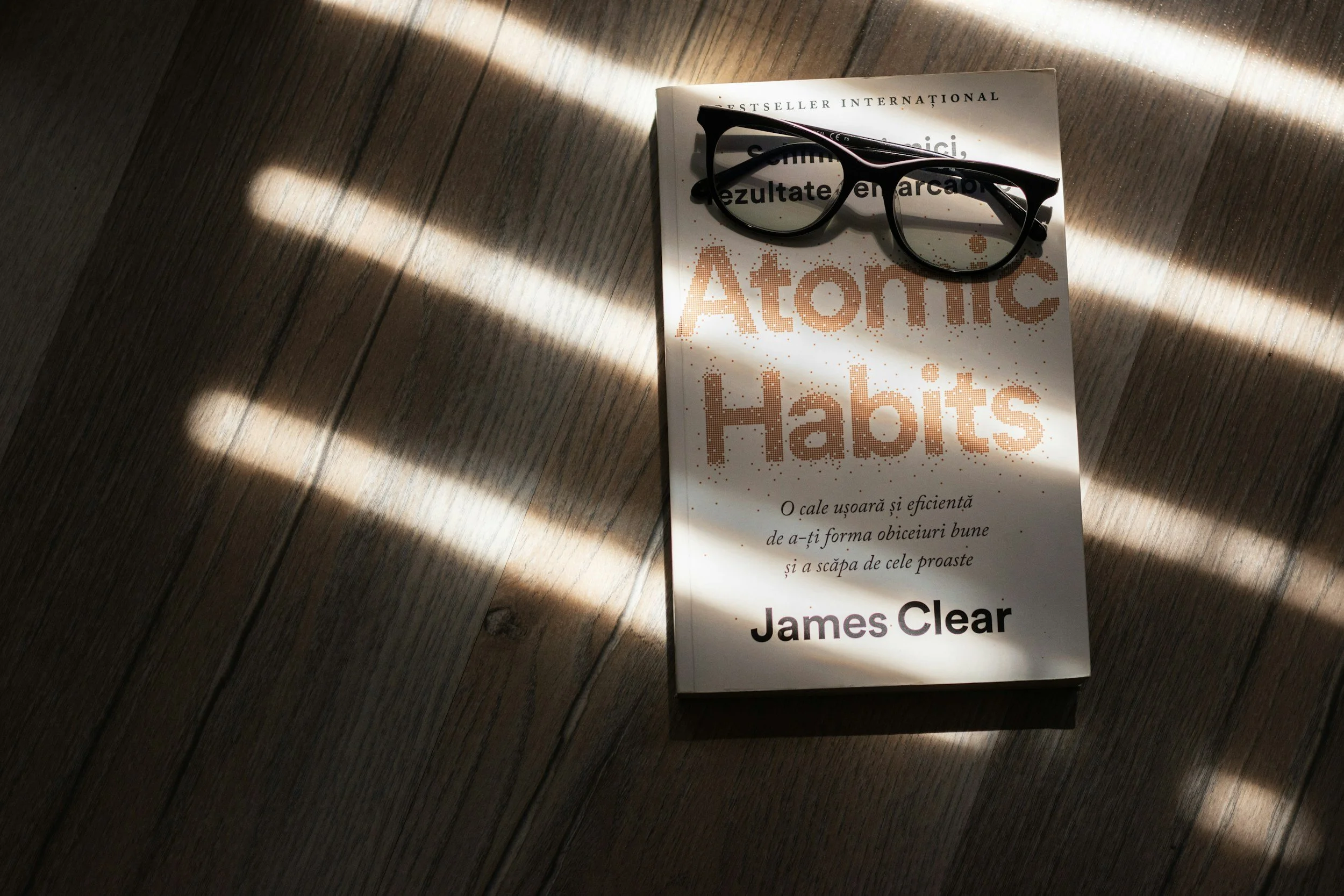
11 Atomic Habits That Make Salespeople Unstoppable
If you have not read Atomic Habits by James Clear, add it to your list. Not because it is a sales book — it is not. It is a book about the architecture of behavior and how small, consistent actions compound into outcomes that feel, from the outside, like talent or luck. Clear's central argument is this: you do not rise to the level of your goals, you fall to the level of your systems.
That line should hit differently if you have spent any time in sales.
Sales is not a skills game, not at its core. The technical skills matter — discovery, objection handling, closing. But the people who sustain high performance over years are not always the most naturally gifted. They are the ones who show up the same way on a Tuesday in February as they do in Q4. They have built systems. They have habits.
I spent ten years in supplier management consulting and have coached cohorts of account executives through year-long programs. Atomic Habits is one of the books I put in front of every single one of them. What follows are the eleven habits I have seen separate average performers from exceptional ones — each one grounded in the principles Clear lays out, and each one practical enough to start this week.
1. Block Time for Business Development Every Single Day
Clear calls this "implementation intention" — the practice of deciding in advance exactly when and where you will do a behavior. Vague intentions die. Scheduled ones survive.
Business development is the first thing salespeople sacrifice when things get busy, and the reason pipelines dry up is almost always traced back to that decision. Block thirty minutes every morning, or at minimum a dedicated window every week, and treat it as protected time. No calls scheduled over it. No internal meetings bleeding into it. Business development is the work that creates all other work, and it deserves to be scheduled like it.
2. Batch Your Email — Protect Your Flow
Responding to every email the moment it arrives is not responsiveness. It is fragmentation. Every time you context-switch to your inbox, you are paying a cognitive tax that takes time to recover from.
The habit: block time every morning and again at the end of the day specifically to process and respond to email. Nothing in between unless it is genuinely urgent. This keeps your response time within twenty-four hours — which is the professional standard clients deserve — while protecting the deep focus you need for everything else. Clear calls this "habit stacking": pair your email block with an existing anchor in your day, like your morning coffee or your end-of-day wrap-up, and it becomes automatic.
3. Never Leave a Call Without Booking the Next Meeting — and Send the Invite Immediately
This is a nonnegotiable. People are busy. Deals do not die in dramatic moments — they die in the gap between "let's follow up next week" and the next time someone actually connects.
The habit is two parts. First, before you hang up or walk out, you have the next meeting booked. Not agreed upon in principle — booked. Date, time, participants confirmed. Second, you send the calendar invite before you do anything else. If you can do it while you are still on the call or in the room, do it. Once something is on someone's calendar, the psychological commitment shifts. It is no longer a vague intention. It is an appointment. Clear writes about how the environment shapes behavior — a calendar invite changes the environment for both of you.
4. End Every Call With a Defined Next Step — and Put It in Writing
Booking the next meeting handles the when. This habit handles the what.
Before you hang up, you name the next step out loud: who owns it, what needs to happen, and what you need from the client to move forward. Then you send a follow-up email that captures all of it. The meeting time. The defined action items. Who is responsible for what. What you are bringing to the next conversation and what you need them to bring.
This email is not a formality. It is a professional signal that you operate with precision, and it is a paper trail that keeps deals from stalling in ambiguity. Clear's principle of "reducing friction" applies here — when the path forward is documented and clear, forward motion is easier for everyone.
5. Review Your Pipeline Weekly — Every Stage, Not Just the Top
Most salespeople review their pipeline when their manager asks them to. That is reactive. The habit is to own that review yourself, every week, before anyone asks.
Go through every stage. Not just what is close to closing — look at what has gone quiet in discovery, what proposals have been sitting unsigned, what introductory calls never converted to a second meeting. Pipeline reviews are not about optimism. They are about clarity. Clear writes that you cannot improve what you do not measure. Your pipeline is the most honest data you have about how your sales motion is actually working.
6. Send One Personal Follow-Up to a Past Client or Warm Contact Every Week
This is the habit that most salespeople intend to do and almost none of them systematize. It feels soft. It is actually one of the highest-leverage activities in sales.
One email, one call, one LinkedIn message per week to someone you have already built a relationship with. Not a pitch. A genuine check-in. Something you read that made you think of them. A result you wanted to share. A referral you wanted to make. Clear writes about the compounding nature of small actions — relationships work exactly this way. The salespeople with the strongest networks did not build them in a sprint. They built them one consistent touchpoint at a time.
7. Prepare Three Discovery Questions Before Every Call
Never walk into a sales call without knowing the three questions you most need answered. Not a script — three anchoring questions that will tell you whether this is a real opportunity, what the actual pain is, and what it will take to move forward.
This habit forces preparation, and preparation changes how you show up. When you have done the work before the call, you listen differently. You are not trying to figure out what to say next — you are actually present with what the client is telling you. Clear calls this "priming" your environment for the behavior you want. Walking into a call prepared is walking in with a different identity — the identity of someone who takes the client's time seriously.
8. Spend Fifteen Minutes a Day Reading About Your Buyer's Industry
Not sales tactics. Not personal development content. Your buyer's industry. Their trade publications, their earnings calls, their regulatory environment, their competitive pressures.
This habit is the one that turns a salesperson into a trusted advisor, and it is the one most people skip because it does not feel immediately productive. It is the most compounding habit on this list. After six months of fifteen minutes a day, you walk into rooms with context that most salespeople do not have. You ask better questions. You earn different conversations. Clear's identity-based habit framework is useful here: decide that you are someone who understands their clients' world deeply, and then act like it every day.
9. Read One Book a Month — Sales, Habits, or Self-Help Adjacent
Sales is a mental game. The technical skills have a ceiling. What separates sustained performers is mindset, resilience, and the ability to keep learning after a hard month.
One book a month. That is twelve books a year. In five years, you will have read sixty books that most of your peers have not. The compounding effect of that learning is real. Clear writes that one of the most powerful ways to change behavior is to change your identity — to become someone who reads, who invests in themselves, who treats their own development as part of the job. Atomic Habits is a great place to start.
10. Live in Your CRM — Daily, Vigorous, No Exceptions
Your CRM is not an administrative burden. It is your operating system. The salespeople who treat it that way perform differently than the ones who log in to prep for a pipeline review.
The habit: every call made from the CRM. Every meeting recorded in it. Notes taken after every client interaction — specific, detailed, useful notes you will actually reference later. Mobile app on your phone so you can update on the go. Any functionality that records calls or auto-logs activity, turned on. The goal is zero duplication of work and complete fidelity to what is actually happening in your accounts. Clear's principle of "reducing friction" applies — the more seamlessly your CRM fits into your actual workflow, the more consistently you will use it. Make it your screen, not your filing cabinet.
11. Keep Your Desk Clean — Weekly Reset, Every Week
This one will feel out of place on a sales habits list. It is not.
A cluttered physical environment creates cognitive load. When your desk is a mess, some part of your brain is always processing the chaos, even when you think you are focused. A clean desk is a clean mind. Every Friday, before you close your laptop, you reset your physical space. Clear writes extensively about how your environment shapes your behavior — this is the most literal application of that principle. You cannot show up sharp if you are operating in disorder.
The Real Point
None of these habits are revolutionary in isolation. That is exactly the point. Clear's central insight is that the aggregation of marginal gains — tiny improvements across many behaviors — produces results that feel extraordinary from the outside but are entirely explainable from the inside.
The salespeople I have watched build careers that last are not doing anything magical. They are doing the fundamentals, consistently, when no one is watching. They have built identity around it. They are not someone who tries to respond to emails quickly — they are someone who batches their email and protects their focus. They are not someone who means to prep for calls — they are someone who always walks in with three questions ready.
That shift, from intention to identity, is what Atomic Habits is really about.
What habit on this list are you already doing well — and which one are you avoiding?

The Problem With Your Sales Strategy Isn't Effort. It's Rhythm.
Finding the Right Sales Growth Consulting Support
This is where sales growth consulting done well makes the difference. Not a consultant who hands you a framework and disappears, but a partner who helps you look honestly at your ratio, your rhythm, and your team, and builds the infrastructure to close the gap.
The founder who is still on every call knows the problem. The sales leader watching her team grind through a thousand touches a month with diminishing returns knows the problem. The answer is not more activity. It is a better rhythm, built around the right accounts, the right timing, and the right people delivering the right message.
That is what great sales growth consulting actually produces: a revenue organization that does not depend on volume to survive, because it has found the cadence that works.
Every sales organization I've ever been around starts in the same place.
More outreach. More calls. More emails. More volume.
And there's a logic to it. If X% of outreach becomes a meeting, and Y% of meetings become deals, then the answer to hitting your number is always more X. Work harder. Move faster. Fill the pipeline.
But somewhere in that math, we've confused two very different things: the rhythm of effort and the rhythm of quality.
The Job Search That Proves the Point
We're watching this play out in real time in the job market right now.
Candidates are applying to hundreds of jobs online and hearing nothing back. The volume strategy, powered by easy application tools and AI, has made it possible to reach more people than ever before. And it has never worked worse.
Meanwhile, someone else sends five personal messages to former colleagues. Hey, I've been thinking about making a move. What's going on at your company? Could there be a fit?
One of those five people has something. Or knows someone who does. And a conversation that actually goes somewhere begins.
Same effort. Completely different rhythm. Dramatically different result.
The Ratio Is Trying to Tell You Something
Here's the first thing I'd ask any sales leader: what is your outreach-to-meeting ratio?
Not to benchmark it against some industry standard. But to actually look at it and sit with what it's telling you.
If you're reaching out to 500 people a month and booking 10 meetings, the answer is almost never reach out to 1,000 people. The ratio is a signal. It's asking you: Was it how you reached out? Was it who you reached out to? Was it what you said?
Before you add volume, answer those questions. Because adding volume to a broken rhythm doesn't fix the rhythm. It just makes the noise louder.
Timing Is Part of the Rhythm Too
Every industry has a financial heartbeat. Budget cycles. Fiscal year ends. Planning seasons.
Odds are, your buyers are doing budget planning in Q3 or Q4 of their financial calendar. Which means the drumbeat that sets you up to close in that window needs to start well before it. Relationships built in Q1 and Q2 close in Q3 and Q4. That's not luck. That's rhythm.
Most outreach ignores this entirely. We reach out when we need pipeline, not when our buyers are ready to hear from us. Then we wonder why the timing never feels right.
Getting in rhythm means understanding how your buyers make decisions and building your cadence around their calendar, not yours.
The Noise Problem Is Getting Worse
The old rule used to be seven touches before someone responds.
It's probably higher now, and the reason is simple. AI has made it possible to send a thousand personalized-looking emails a day. So that's what everyone is doing. Inboxes are flooded with outreach that was clearly written by no one, for everyone.
Buyers have gotten better at ignoring it. Faster. More automatically.
The arms race of more volume, better automation, and more sequences is running directly into a wall of indifference that gets higher every quarter.
Breaking through that wall doesn't require better automation. It requires a different rhythm entirely.
What If We Stopped Pressing for Volume?
What if instead of measuring your BDRs on calls per day, you helped them find the rhythm of calling the right people, at the right time, in the right way?
What would that look like?
It might mean smaller lists of higher-fit accounts instead of massive high-volume sequences. It might mean mapping outreach timing to your buyers' budget cycles instead of your own quota calendar. It might mean one genuinely personal message that references something real instead of ten templated touches that reference nothing.
It would almost certainly mean a better outreach-to-meeting ratio. Fewer conversations that go nowhere. More pipeline that actually closes.
And it would mean something else, something harder to measure but just as important: BDRs who feel like they're doing meaningful work instead of burning out on a call treadmill that was never going to work anyway.
Finding Your Sales Rhythm
Rhythm isn't about slowing down. It's about moving in a way that's in sync with the world around you, your buyers, your market, your timing.
The best salespeople I've ever worked with weren't the ones making the most calls. They were the ones who had figured out their rhythm. They knew who to call, when to call, what to say, and how often to follow up. Not because someone gave them a script, but because they'd paid attention, adjusted, and found what actually worked.
That's what we should be building. Not faster machines. Better rhythm.
What does your outreach-to-meeting ratio tell you about your current sales rhythm? I'd love to hear what's working and what isn't.

Why 45 Million Workers Can't Actually Take Spring Break
March and April. Every single year. The schedule chaos begins.
And for most organizations, here is exactly what happens:
Everybody requests time off. Their manager approves it. And then nobody actually plans for coverage.
Because in a world where you can reach anyone at any time, we have all adopted the same terrible philosophy: If there is an emergency, I will just call them.
The Problem Nobody Talks About
I have watched this play out at every company I have worked for.
Someone takes spring break off. They are technically on vacation. But they are not really off.
Because in the back of their mind, they are thinking: What if they need me?
So they check their email. They answer a few Slack messages. They take a quick call during the family road trip.
And when they get back, every single thing that was not an emergency is still sitting there, waiting for them.
We call this a vacation policy.
This is not a vacation problem.
This is a coverage problem.
What We Need Is a Vacation Plan
Having a vacation policy is not enough.
You need a vacation plan.
That means:
Someone is actually covering the work. Not just "handling emergencies." Not just "keeping an eye on things." Actually doing the work.
The coverage person has authority. They can make decisions. They can approve things. They are not just a placeholder.
Work does not pile up on someone's desk. If it is important enough to do, it gets done while they are out. If it is not important enough to do, why are we doing it at all?
People can actually disconnect. No email. No Slack. No "just a quick question." Fully off.
This is how vacation is supposed to work.
But most organizations never build this.
Why We Do Not Plan for Coverage
Because planning for coverage is hard.
It requires you to actually document what people do. It requires cross-training. It requires redundancy.
And most companies would rather just call someone on vacation than build those systems.
But here is what that costs you:
52% of employees reported feeling burned out in 2024. More than eight out of 10 employees are at risk of burnout this year.
And physicians who work while on vacation have higher rates of burnout.
People are not actually recharging. They are half-resting. And that does not work.
The Spring Break Reality
Spring break is not just one week.
Different school districts take spring break at different times from mid-March through mid-April.
So for six straight weeks, you have rolling absences across your team.
And if you do not have a real vacation plan, here is what happens:
Week 1: Sarah is out. Nobody covers her accounts. Clients email her. She responds from the beach.
Week 2: Mike is out. His projects stall. Tom picks up the slack.
Week 3: Tom is out, who covered for Mike now has to take time out of his vacation to update Mike.
Week 4: Jen is out. Her direct reports are back from vacation and have questions about what they missed.
By Week 5, your entire team is exhausted, nothing got fully covered, and everyone who took vacation feels guilty.
This is not sustainable.
How to Build a Real Vacation Plan
Here are 10 things you can do as leadership to actually support your people when they take time off.
1. Document Everything
You cannot cover someone if you do not know what they do.
Every role should have documentation:
Daily tasks
Weekly responsibilities
Monthly deliverables
Who depends on them
Who they depend on
Key contacts and logins
Decision-making authority
If someone cannot take a week off without everything falling apart, that is a documentation problem.
2. Cross-Train Your Team
Nobody should be the only person who knows how to do something.
Build redundancy into every critical function.
This does not mean everyone needs to know everything. But at least two people should be able to handle each key responsibility.
3. Assign Coverage, Do Not Assume It
When someone requests vacation, their manager should immediately answer: Who is covering this?
Not "we will figure it out." Not "just handle emergencies."
Actual assigned coverage with authority to make decisions.
4. Brief the Coverage Person
The person taking a vacation should spend 30 minutes briefing the person covering.
Here is what is in flight. Here is what might come up. Here is who to contact. Here is what needs decisions.
Make it easy for the coverage person to step in.
5. Give Coverage People Authority
If someone is covering, they need to be able to approve things, make decisions, and move work forward.
Otherwise, everything just waits. And that defeats the purpose.
6. Block Calendar Notifications
When someone is on vacation, their calendar should show "Out of Office" for every time slot.
No meetings. No recurring check-ins. No "quick syncs."
Fully blocked.
7. Auto-Responders That Actually Help
The out-of-office message should say:
"I am on vacation and will not be checking email. For urgent matters, contact [Coverage Person] at [email/phone]."
Not "I will have limited access to email."
That just means you will check it and feel guilty.
8. No Slack, No Email, No Exceptions
If someone is on vacation, they should not be in Slack. They should not be checking email.
And the team needs to respect that.
If you reach out to someone on vacation, you are telling them: Your rest does not matter. The work is more important.
Do not do that.
9. Debrief When They Return
When someone comes back from vacation, do not dump everything on them immediately.
Give them time to catch up. Brief them on what happened. Let them ease back in.
The goal is to make vacation actually restful, not just a delay before chaos.
10. Model It from the Top
If leadership does not take real vacation, nobody else will either.
Leaders need to visibly take time off, fully disconnect, and trust their teams to handle things.
That sets the tone for the whole organization.
What This Actually Looks Like
I worked with a company that implemented a real vacation plan.
Every time someone requested PTO, their manager had to assign coverage and confirm it in writing.
The coverage person got a 30-minute handoff call.
The person on vacation turned off Slack and email notifications.
And the team had a standing rule: Do not contact someone on vacation unless the building is literally on fire.
What happened?
People actually rested. Burnout went down. Retention went up.
And the team improved its documentation and cross-training because they had to.
The systems improved because vacation became non-negotiable.
The Bottom Line
If you have a vacation policy but no vacation plan, you are just pretending people can take time off.
Real time off requires:
Coverage that actually works
Documentation so people can step in
Authority for coverage people to make decisions
A culture that respects boundaries
Spring break happens every year.
March and April are always going to be chaotic if you do not plan for it.
So stop relying on "just call them if you need them" and start building real coverage systems.
Your people deserve to actually rest.
And your business will be better for it.
About Molly Means
Molly Means is a business operator who writes about Traction, operations, leadership, and organizational clarity. Her work is informed by experience building and operating companies and helping teams create structure that actually works.
Connect: LinkedIn
No Need for New Apps. Claude Can Do It.
I downloaded a calorie-tracking app last month.
Opened it. Started setting up my profile. Height, weight, goals, and activity level. The usual setup takes ten minutes and feels like work before you even log your first meal.
And then I stopped.
Wait a second. Can Claude do this?
So I deleted the app and opened Claude instead.
I took a picture of my breakfast. Told Claude my calorie goals and my protein goals for the day. Asked it to track my meals and remind me at the end of the day if I had not hit my protein target.
And it worked.
Better than the app, actually.
Because Claude does not just track data. It coaches.
At 8 PM, Claude sent me a reminder: "You are 40 grams short on protein today. Want to grab some almonds or chicken?"
That is not something a calorie app does. That is something a personal nutritionist does.
And that is when I realized something.
I probably do not need most of the apps on my phone anymore.
The Apps I Have Already Replaced
I started going through my phone to see what else Claude could do.
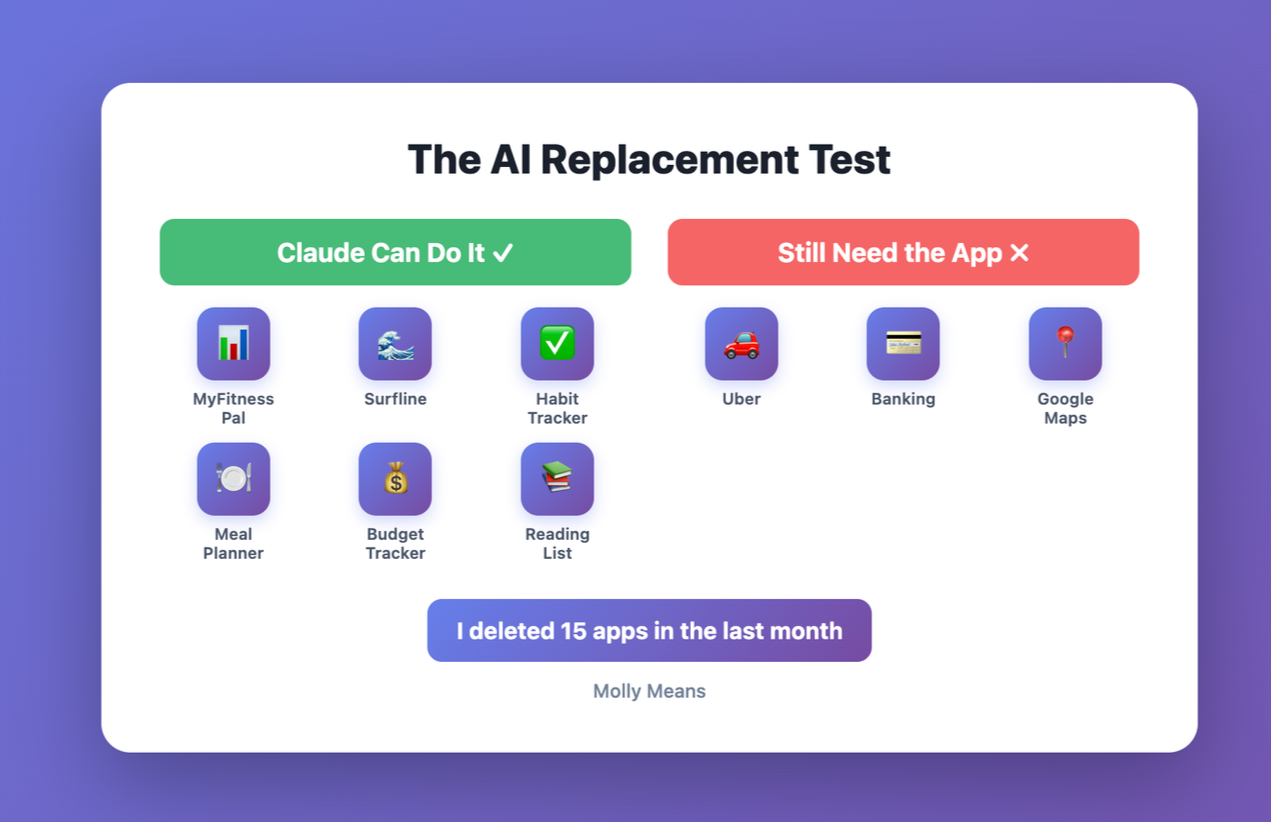
Habit tracker? Gone. I do my Level 10 from Traction as a personal check-in with Claude. It tracks my habits, reminds me of what I committed to, and gives me weekly summaries.
Surfline? Canceled my subscription. Now every Monday, Claude sends me a report on the best days that week to go surfing and automatically adds low tide for each day to my calendar so I know when it’s best to walk my dog. It pulls weather data, tide charts, and swell forecasts. I plan my month around it.
Meal planning app? Deleted. I tell Claude what is in my fridge and what I feel like eating. It suggests recipes and builds a plan. I can take a photo of my fridge and spice rack and have recipes in seconds.
The pattern became clear.
If an app is just collecting data and giving me summaries or reminders, Claude can do it better.
Because Claude understands context. It remembers my preferences. It adapts to how I actually live instead of forcing me into rigid tracking systems.
What Else Can Claude Replace?
I asked Claude what other apps I should try replacing. Here is what it told me.
Apps Claude can definitely replace:
Reading list apps (Pocket, Instapaper) - Send links to Claude, it summarizes articles and reminds you to read them
Language learning flashcards (Anki, Quizlet) - Claude quizzes you and adapts difficulty based on performance
Trip planning apps (TripIt, Wanderlog) - Tell Claude where you are going, it builds itineraries and adjusts as plans change
Recipe box apps (Paprika, Copy Me That) - Claude saves recipes, scales ingredients, suggests substitutions
Journal apps (Day One, Journey) - Daily check-ins with Claude work better than typing into a blank page
Meditation/mindfulness trackers - Claude can guide sessions and track your practice
Apps Claude probably cannot replace yet:
Navigation (Google Maps, Waze) - Still need real-time GPS and traffic
Banking apps (Chase, etc) - Security and account access require dedicated apps
Ride-sharing (Uber, Lyft) - Need direct integration, but this is coming
Streaming (Spotify, Netflix) - Playback needs dedicated apps
Social media (Instagram, LinkedIn) - For now, but maybe just for posting
The Framework: Can Claude Do It?
Here is the question I now ask before downloading any new app.
Is this app just collecting data and giving me summaries or reminders, or does it need to control hardware or access secure systems?
If it is the first one, Claude can probably do it better.
If it is the second one, I still need the app. For now.
But even for those apps, I think the future looks different.
What I Actually Want (And What I Think Is Coming)
I do not want to open Uber to book a ride.
I want Claude to see my calendar, know I need to be at the airport at 6 AM, and automatically schedule the Uber because it already has access to my calendar and knows I am traveling for work.
I do not want to open Surfline to check the surf forecast.
I want Claude to know I surf and proactively tell me when conditions are good.
I do not want to open ten different apps to manage ten different parts of my life.
I want one interface that talks to everything else on my behalf.
That is the vision.
One AI on my screen. Everything else becomes backend plugins that the AI talks to without me ever opening those apps.
The Battle for Your Screen
I think we are about to see a massive battle for who is on your screen the most.
Right now, Apple and Google make money because we download hundreds of apps from their app stores. Every app is a potential revenue stream. Subscriptions. In-app purchases. Ad impressions.
But what happens when we no longer need those apps?
What happens when the only app on our phone is Claude or ChatGPT or whatever AI assistant we choose, and everything else is just a plugin running in the background?
That is a huge problem for Apple and Google.
But I think they will figure it out.
Maybe the App Store becomes a Plugin Store. Maybe they charge for the integrations instead of the apps. Maybe the business model shifts entirely.
I do not know who wins this battle.
But I do think it is coming.
Because once you experience how much easier it is to have one intelligent assistant that knows everything about you and talks to all your tools on your behalf, going back to opening twenty different apps feels archaic.
What I Am Doing Now
Before I download any new app, I ask myself: Can Claude do it?
And I am going through the apps I already have and asking: Do I still need this, or can Claude handle it?
So far, I have deleted about fifteen apps.
My phone feels cleaner. My cognitive load feels lighter. And I am getting better results because Claude actually understands what I am trying to accomplish, rather than just collecting data points.
This is not about being anti-app or anti-technology.
This is about being intentional about what tools I use and how I use them.
And right now, for a busy person who is often distracted and frequently forgets to eat lunch, having an AI that can track my nutrition, remind me to eat protein, and coach me through my goals is significantly better than downloading another tracking app that requires manual data entry and gives me charts I will never look at.
The Bigger Shift
I think this is part of a bigger shift happening right now.
We have been over-apping ourselves for years.
Every problem has its own app. Every feature has its own subscription. Every workflow has its own tool.
And now we are drowning in apps that do not talk to each other, require constant context switching, and need manual data entry to work.
AI changes that equation entirely.
One intelligent assistant that knows you, understands context, and can interact with other systems on your behalf is fundamentally more powerful than a hundred single-purpose apps.
The future is not more apps.
The future is fewer, smarter tools.
And for many use cases, that tool is just going to be your AI assistant.
What About You?
Here is what I want to know.
What apps have you replaced since getting access to Claude or ChatGPT or another AI assistant?
What apps have you decided not to download because you realized your AI could do it?
And what apps are you keeping because there is no way AI can replace them yet?
I am genuinely curious what other people are figuring out.
Because I think we are in the early days of this shift, and the companies that understand where this is going will build very differently from those still thinking in terms of single-purpose apps.
The battle for your screen is just beginning.
And I think a lot of apps are about to lose.
About Molly Means
Molly Means is a business operator who writes about Traction, operations, leadership, and organizational clarity. Her work is informed by experience building and operating companies and helping teams create structure that actually works.
Connect: LinkedIn
Death of CRMs? I Think Not.
When AI tools started launching in 2024 and 2025, SaaS stocks took a beating.
Investors looked at what ChatGPT and Claude could do and thought: why would anyone pay for a CRM when AI can do this for free?
HubSpot stock dropped. Salesforce stock dropped. The narrative became: legacy SaaS is dead, AI killed it.
But here is what everyone is missing.
CRMs are not dead. They are just getting unbundled and rebuilt from scratch.
And the companies that survive this transition are going to be worth a lot more than they are today.
The New Players Nobody Saw Coming
In the last six months, a wave of AI-first CRM companies raised massive funding rounds.
Day AI raised $20 million from Sequoia to build what they are calling "the Cursor of CRM." The founder is a former HubSpot executive who left to build what he thinks HubSpot should have been.
Reevo raised $80 million from Khosla Ventures and Kleiner Perkins in November 2025. They are building an AI-native platform that replaces your entire go-to-market stack. Marketing, sales, and customer success in one system. No integrations. No third-party tools. Just AI doing the work.
Attio has raised over $100 million. Clarify calls itself the world's first autonomous CRM and raised $22.5 million.
These are not small bets. These are serious companies with serious backing going after the core of what Salesforce and HubSpot have built over the last twenty years.
And the pitch is compelling.
Why use a CRM that requires manual data entry when AI can capture everything from your emails, calls, and meetings automatically? Why build complex workflows and integrations when AI can understand context and take action on its own?
It is a good question.
The Problem Everyone Is Ignoring
But here is what I learned from trying to implement new software at scale.
The real cost of switching is not the software. It is the people.
CRM is all about muscle memory. Getting salespeople to actually use it. Getting them comfortable with the interface. Getting them to trust that the system works.
If you have ever tried to get a sales team to adopt a new CRM, you know exactly what I am talking about.
They went kicking and screaming into the first one. Convincing them to switch to a second one is exponentially harder.
Unless the new system saves them personally and obviously five hours a week from day one, they are not going to want to change.
And even if the new system is better, you still have the training problem.
When you are talking about thousands of salespeople across multiple regions who have finally learned how to use Salesforce or HubSpot, the idea of retraining all of them on a completely new platform is not a software decision.
It is a change management nightmare.
That is the moat that HubSpot and Salesforce have that nobody talks about.
It is not that their technology is better. It is that switching away from them is painful enough that most companies will not do it unless they absolutely have to.
What HubSpot and Salesforce Will Do
So here is my prediction.
These AI-first CRM companies are going to build incredible technology. They already are.
And HubSpot and Salesforce are going to watch them very closely.
Then they are going to acquire the best ones.
This is what big tech companies do. They let startups figure out what works, then they buy the winners and integrate the technology into their existing platforms.
Salesforce has done this for decades. HubSpot has done it. Microsoft does it. Oracle does it.
It is a proven playbook.
The question is not whether HubSpot and Salesforce will adapt to AI. The question is how well they execute their acquisition strategy and how fast they can deploy those acquisitions once purchased.
If they move quickly and integrate well, they will be fine.
If they are slow and the acquisitions turn into shelfware, the AI-first companies have a real shot.
But betting against HubSpot and Salesforce adapting is like betting against Amazon figuring out cloud computing. These are not dumb companies. They have resources. They have distribution. And they have the one thing startups do not have: millions of users who are already locked in.
The Only Way The Big Guys Fall
There is only one scenario where I think HubSpot or Salesforce actually lose this fight.
If an AI-first CRM launches that saves every salesperson ten hours per week, and it does it immediately with no training required, and the incumbents are too slow to copy it.
That would be the Blockbuster versus Netflix moment.
But that is a very high bar. And it has to happen fast enough that the big companies cannot respond.
I have not seen that yet.
What I have seen is really interesting technology that is incrementally better, but not so dramatically better that it justifies the pain of switching for companies that already have a CRM in place.
What You Should Do If You Are Choosing a CRM Right Now
If you are a company that does not have a CRM yet, this is actually the best time to be making this decision in years.
Because you do not have switching costs. You are starting from zero.
Here is what I would do.
Look at the big players and see what they are doing in AI. HubSpot just launched Breeze AI in September 2025. Salesforce has Einstein. These are not bolt-on features. They are serious investments in making their platforms smarter.
But know that their roadmap to rolling out new AI products is going to be much longer than a technology startup focused purely on innovation.
Branch out and look at the new ones. Day AI. Reevo. Attio. Clarify. See what they are building. Run pilots if you can.
Nobody likes to be first to a new software system. But right now, if you are buying net new, this is the time to do competitive analysis and really dive into what the technology can do.
Because once you choose a CRM, the cost to switch is so high that you are probably locked in for five to ten years.
So the question you need to answer is not just "what does this CRM do today?"
The question is "how is this technology going to grow with me, and how much time is it saving my people right now?"
If you cannot answer both of those questions confidently, keep looking.
The Questions You Need to Ask
When you are evaluating any CRM, new or old, here are the questions that actually matter.
How much time does this save my salespeople per week?
Not in theory. In practice. If the answer is less than five hours per person per week, it is probably not worth switching from what you already have. If you are net new, make sure you can actually measure this in a pilot.
How much of this is actually AI versus just automation with better marketing?
A lot of companies are calling things AI that are really just workflow automation. Real AI should be learning from your data, making decisions, and getting smarter over time. If it is just following rules you programmed, that is automation. Still valuable, but not the same thing.
What happens to my data if I need to leave?
This is the question nobody asks until it is too late. Can you export everything? In what format? How much institutional knowledge is locked in this platform in a way that does not transfer?
How long does it take to get value?
If the answer is "six months after a complex implementation," that is a red flag. The best software works quickly. If it takes half a year to see results, you are probably building on top of old architecture that was not designed for what you are trying to do.
Who else uses this, and how big are they?
Startups will always show you their best case studies. Ask for references at your scale. If you are a fifty person company, talk to other fifty person companies. If you are enterprise, talk to enterprise customers. The challenges are completely different.
The Real Opportunity
Here is what I think is actually happening.
The SaaS stocks dropped because investors panicked. They saw AI and thought it was going to replace everything.
But the best SaaS companies are not going to get replaced. They are going to adapt.
And when they do, their EBITDA is going to increase significantly.
Because AI lets them cut costs in a way they never could before. Fewer developers. Fewer support staff. Fewer implementation consultants.
The products get better and the cost structure gets leaner.
That is a great combination for investors.
The people who think AI will kill software are wrong.
The best software companies will adapt with AI. They will acquire the best emerging players. They will integrate that technology into platforms that already have millions of users.
And their stock prices, which have fallen significantly, are probably going to recover and grow once they figure out how to make themselves more AI forward.
This is not the end of SaaS. This is the next chapter.
What This Means for Companies Evaluating CRMs
If you already have a CRM and it is working, do not switch just because something shinier launched.
The switching cost is real. The training cost is real. The risk of breaking things that currently work is real.
Wait and see how the market shakes out. Let other companies be the guinea pigs. Your current CRM is probably going to add AI features in the next twelve to twenty four months anyway.
But if you are buying net new, do your homework.
Look at the AI-first options. Understand what they can do that the legacy players cannot. Run pilots. Measure actual time savings.
And then make a decision based on where you think the technology is going to be in five years, not where it is today.
Because whatever you choose, you are probably going to be stuck with it for a while.
The Bottom Line
CRMs are not dead.
They are being rebuilt with AI at the core instead of bolted on top of twenty year old architecture.
The companies that win will be the ones that either build AI-native from the start, or acquire and integrate AI-native technology faster than their competitors can respond.
HubSpot and Salesforce have massive advantages. Distribution. Users. Resources. Proven acquisition strategies.
But they are not invincible.
If they move too slowly, or if an AI-first CRM delivers a step-function improvement that is too big to ignore, the market could shift faster than anyone expects.
My bet is on the incumbents adapting. But I am watching the new players very closely.
Because the only constant in technology is that the moment you think someone is unbeatable, they get beaten.
AI-First CRMs Worth Watching
If you are evaluating new CRM systems, here are the AI-first companies that raised significant funding in 2024-2025:
Day AI - $20M from Sequoia (January 2026)
Former HubSpot executives building "the Cursor of CRM"
Focuses on AI that ingests all your work data and acts as a virtual assistant
Positioning: CRM that knows everything about your business in 15 minutes
Reevo - $80M from Khosla Ventures and Kleiner Perkins (November 2025)
Replaces entire go-to-market stack (marketing, sales, customer success)
AI-native platform built from scratch, not retrofitted
Positioning: Revenue operating system that eliminates tool sprawl
Attio - $100M+ raised to date
AI-driven workflows and automated follow-ups
Strong in customization and flexibility
Positioning: CRM that adapts to how you work, not the other way around
Clarify - $22.5M Series A (2024)
Calls itself "the world's first autonomous CRM"
Automatically captures meetings, updates contacts and deals
Positioning: CRM that runs itself with minimal manual input
These are not recommendations. They are companies that raised serious money from serious investors and are worth evaluating if you are in the market for a new CRM.
About Molly Means
Molly Means is a business operator who writes about Traction, operations, leadership, and organizational clarity. Her work is informed by experience building and operating companies and helping teams create structure that actually works.
Connect: LinkedIn

The Technology Your New Hire Swears By (And Why It Probably Won't Work)
How many times has this happened to you?
You hire a talented executive from a larger, more successful company. They walk in the door with energy and confidence. And within the first week, they tell you exactly what you need.
"At my last company, we used this technology. It was amazing. We need it here ASAP."
They are convinced. They have seen it work. They know it can transform your business the same way it transformed theirs.
And if you are being honest, part of you wants to believe them.
Because if the problem is just technology, then the solution is simple. Buy the software. Implement it. Watch the results roll in.
But here is what I have learned after making this mistake.
Technology does not solve anything that does not already have an underlying process.
And the technology that worked brilliantly at your new hire's previous company probably will not work the same way here.
Not because the technology is bad. But because the context is completely different.
The Story
I hired an executive from a larger landscaping company.
They came from an operation that had everything dialed in. Clean processes. Documented workflows. A team that executed with precision.
They ran a specific industry software that was the gold standard for commercial landscaping. Purpose built. Proven at scale.
My new executive was confident. "This is what we need. I have seen it work at the highest level."
The argument made sense. We were struggling with operational consistency. Our processes were inconsistent across regions. We needed systems.
And here was someone who had seen those exact problems solved with a specific piece of technology.
So I gave them three months to prove it.
What New Hires Do Not See
Here is what my executive did not tell me, because they genuinely did not realize it themselves.
At their previous company, the software had been implemented years earlier by a dedicated team. Workflows were already built. Integrations were already configured. Best practices were already documented. Training was already systematized.
They walked into a mature system and it worked beautifully.
What they had never experienced was the implementation phase.
The configuration decisions. The integration complexity. The change management required to get a team to adopt a new platform. The months of iteration to get workflows right.
They saw the end state and assumed the path to get there was straightforward.
But implementation is where most technology initiatives fail.
And we learned that the hard way.
Month One: Looks Promising
The first month looked good.
The interface was clean. The industry specific features were exactly what my executive remembered. The support team was responsive.
We started configuring workflows. Setting up templates. Importing data. Training the team on the basics.
It felt like progress.
Month Two: Problems Emerge
The second month revealed the cracks.
Configuring workflows for our specific business model required custom fields and workarounds. What looked simple in the demo turned out to be complex in practice.
Training took longer than expected. The learning curve was steeper than my executive remembered. The team was frustrated because they had to abandon systems that were working and learn something completely new.
Integration with our existing tools was harder than anticipated. Data did not flow cleanly. We were doing manual workarounds to keep things running.
But the biggest issue was something we had not anticipated at all.
The Hidden Switching Cost
We had spent years building a massive pricing spreadsheet.
It was not elegant. It was not simple. But it worked.
Our sales team knew that spreadsheet cold. They could price a commercial property in fifteen minutes by looking at square footage, property type, regional cost variations, seasonal factors, and service mix.
That spreadsheet represented institutional knowledge. Years of won deals, lost deals, margin lessons, and competitive intelligence baked into a system the team trusted.
The new software had its own estimating and bidding module. Sophisticated and feature rich.
And it would have required completely retraining our sales team on the most complex part of their job.
My executive had not thought about this deeply. At their previous company, the team had been trained on this software from the beginning. It was the only estimating system they had ever known.
But our team had different muscle memory. Our spreadsheet was their source of truth.
Asking them to abandon that and learn a new estimating system, especially during a growth phase when we needed them selling, was a massive hidden cost no one had calculated.
Then we discovered the data problem.
The way we bid jobs was a combination of labor and materials bundled together as a single line item for each scope of work. That is how our team thought about pricing. That is how our proposals were structured. That is how years of historical data had been built.
The new platform needed it broken out.
Labor on one line. Materials on another. Every single line item of every single job separated and categorized before it could be imported.
This was not a weekend project. This was not something we could clean up overnight. Years of historical pricing data, hundreds of job types, thousands of line items, all structured in a way that was incompatible with the new system.
To migrate correctly, we would have had to restructure how we thought about bidding entirely. That meant retraining the sales team not just on new software but on a fundamentally different way of constructing a bid.
Then came the vendor problem.
We needed to upload every vendor and their pricing into the system. That sounds straightforward until you realize our vendor pricing was not static.
Material costs varied significantly depending on the time of year. Mulch in spring costs more than mulch in fall. Plant material in peak season is priced completely differently than off season. Hardscape materials fluctuate with supply chain conditions.
A system that assumes stable vendor pricing does not reflect how commercial landscape installation actually works. Maintaining accurate pricing in the system would have required constant manual updates every time a supplier adjusted their rates, which in our business was constantly.
And then we hit the most fundamental problem of all.
The platform had been built for landscape maintenance. Recurring contracts. Predictable scopes. Repeatable line items season over season.
That is a completely different world from custom landscape installation.
Installation is project based. Every job is different. A commercial property renovation involves custom grading, unique plant palettes, site specific drainage solutions, one of a kind hardscape designs. There is no repeatable template. Every bid is built from scratch based on the specific conditions of that property.
The software was not designed for that complexity. It was designed for the predictable, repeatable world of ongoing maintenance contracts where the scope this year looks a lot like the scope last year.
Our business was the opposite. Every project was custom. Every bid required judgment, creativity, and site specific knowledge that could not be templated.
We were trying to fit a custom installation business into software built for a maintenance business. Those are not the same thing. And no amount of configuration was going to change that.
Nobody had mentioned any of this in the demo.
Month Three: Uncle
After three months of working with support teams, managing team frustration, and falling behind on our growth timelines, my executive called me.
"I was wrong. We need to pivot."
To their credit, they said it directly. No excuses. No blame. Just honest acknowledgment that what worked at their previous company was not working here.
We shut it down.
What New Hires Confuse
Here is what that experience taught me.
New hires confuse the technology with the underlying system that made the technology effective.
At their previous company, the software worked because:
Processes were already defined and documented before the software arrived. The team was already trained and aligned on a common methodology. Integrations had been built and tested over years. Workflows had been refined through iteration and failure. Leadership had committed to the platform and enforced consistent adoption.
The software was not the reason those things existed. The software was the tool that enabled those things once they already existed.
But my executive saw the tool and assumed the tool created the system.
It did not. The system created the conditions for the tool to work.
We did not have those conditions. We did not have documented processes. We did not have standardized workflows. We did not have a team trained on a common methodology.
Dropping that software into our environment did not create a system. It created confusion.
Because technology does not solve process problems. It amplifies whatever process you already have.
If your process is good, technology makes it better.
If your process is inconsistent, technology makes the inconsistency more visible and more painful.
What We Did Instead
After the failure, we took a completely different approach.
We did not start with technology. We started with process.
What does our sales process actually look like today? How do leads come in? How do we qualify them? How do we estimate jobs? How do we follow up? How do we close deals?
We mapped the current state. Messy, inconsistent, but real.
Then we asked: what should this look like if we designed it intentionally?
We documented the ideal workflow from lead to close to renewal. Only after we had clarity on the process did we choose technology.
And we chose a platform that fit where we actually were, not where our executive had come from.
We also kept the pricing spreadsheet.
We did not throw away years of institutional knowledge to fit a new platform. Instead we built an AI agent that works directly within the spreadsheet. The agent suggests pricing based on historical data, flags outliers, and pulls regional cost adjustments automatically.
But the sales team still works in the environment they know. The AI makes them faster and more accurate without requiring them to rebuild their muscle memory from scratch.
New technology layered on top of existing knowledge. Not replacing it.
That distinction made everything easier.
The Pattern I See Everywhere
This is not unique to one software or one industry or one executive.
I see this pattern constantly.
A new leader joins from a more sophisticated company. They bring a technology recommendation. They are confident it will solve your problems because they saw it solve similar problems before.
And most of the time, it fails.
Not because the technology is bad. But because the leader is confusing the tool with the system that made the tool effective.
They saw a well oiled machine and assumed the machine was the tool.
But the machine was the combination of process, people, training, leadership commitment, and years of iterative refinement. The tool just enabled it.
When you drop that tool into an environment without those underlying conditions, it does not magically create them.
It just creates expensive shelfware.
The Four Questions to Ask
When a new executive tells you they have the perfect technology from their previous company, here is what to ask before you buy anything.
How long had that technology been implemented when you started using it?
If the answer is "it was already there when I joined," they have never experienced implementation. They only know the mature state. That does not mean the technology is wrong. But it means they cannot accurately estimate what it will take to get there from here.
What processes were already in place before the technology arrived?
If they cannot answer this clearly, they do not understand what made the technology effective. They are confusing the tool with the conditions that made the tool work.
What would we need to change about how we currently operate to make this technology work here?
If the answer is "not much, the technology handles it," that is a red flag. Good technology enables good process. It does not replace the need for one.
What happens if we build the process first and then choose technology that fits it?
If they resist this question, they are more attached to the tool than the outcome. That is worth paying attention to.
The Real Lesson
The problem is never "we do not have the right technology."
The problem is always "we do not have clear, documented, repeatable processes."
Technology is the accelerant. Process is the foundation.
If you pour accelerant on a weak foundation, you just burn faster.
Build the foundation first. Document how things should work. Train people on the process. Get alignment on the workflow.
Then choose technology that supports that process.
Not the other way around.
What Happened With My Executive
My executive became one of the strongest advocates for process first, technology second.
After the failure, they led the effort to document our sales workflows. They built the training programs. They identified where we needed standardization and where we needed flexibility.
They brought something more valuable than the software recommendation they came in with.
They brought hard won perspective on what actually works versus what looks like it should work.
That perspective came from failing. And it made them a better operator and a better leader.
The Bottom Line
The next time a new hire tells you about the amazing technology from their last company, do not dismiss it.
But do not implement it either.
Ask them to help you understand the processes that made that technology effective.
Document those processes first.
Then evaluate whether that technology is the right fit for your context, or whether something different would serve your actual needs better.
Technology is easy to buy.
Process is hard to build.
Do not let the excitement of a new tool distract you from the harder and more important work.
About Molly
Molly Means is a business operator who writes about Traction, operations, leadership, and organizational clarity. Her work is informed by experience building and operating companies and helping teams create structure that actually works.

Why I Switched from ChatGPT to Claude (And Why It Was Easier Than I Expected)
ChatGPT vs Claude: What Actually Matters
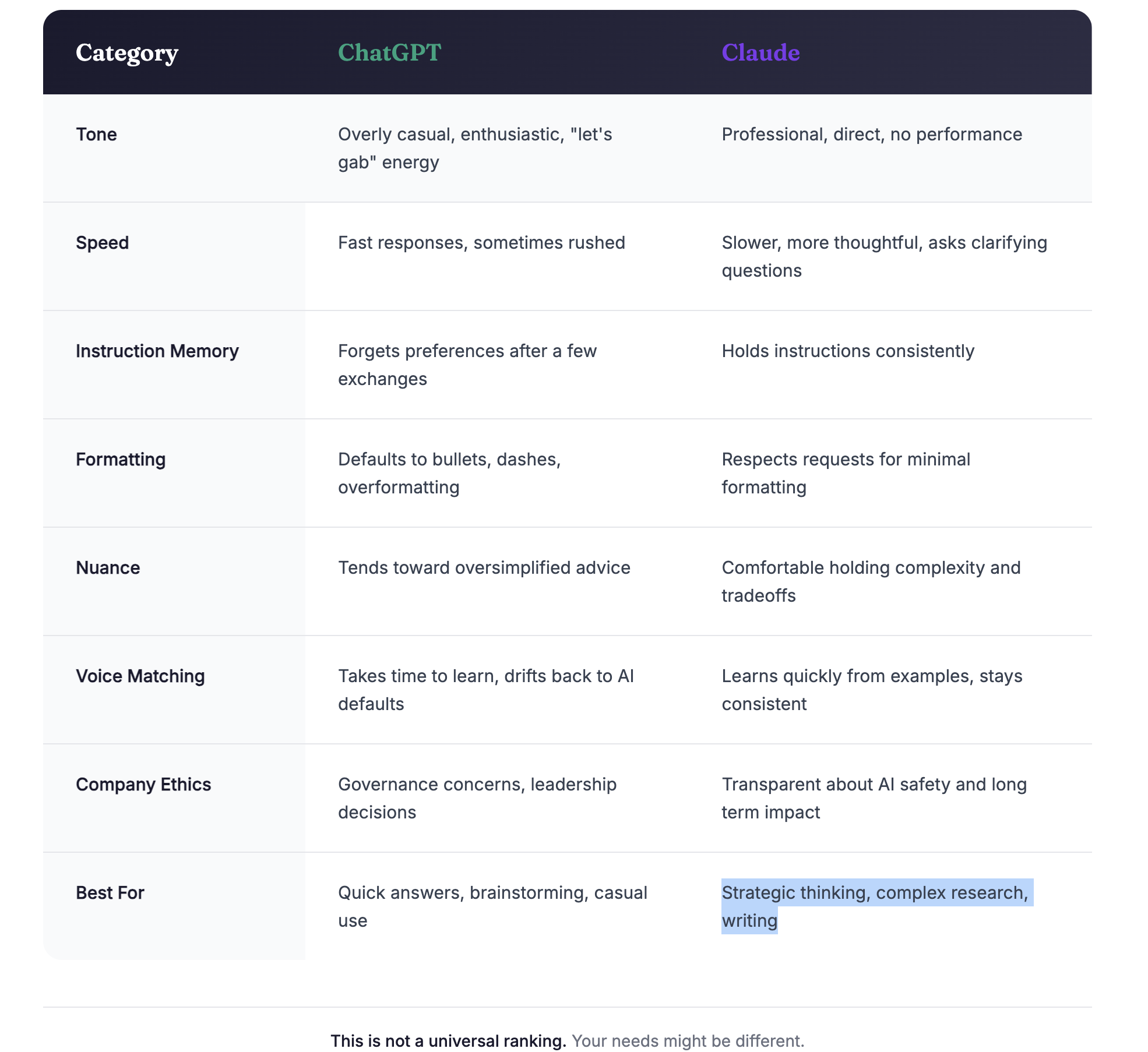
Here is what the comparison looked like for my use case.
I switched from ChatGPT to Claude a few weeks ago.
Not because of the super bowl ads. Not because of pricing. Not even because of feature differences.
I switched because of how the company is being run.
The Real Reason: Ethics Over Features
Tech companies eventually monetize. We all know this. I am not naive about how platforms make money, and I am not opposed to paying for tools that provide value.
But there is a difference between monetization and the way a company operates at its core.
Anthropic, the company behind Claude, has been far more transparent about their approach to AI safety, governance, and the long term impact of what they are building. That transparency matters to me.
So I made the switch.
What I Thought Would Be Hard
I expected migration to be a nightmare.
I had years of conversation history in ChatGPT. Saved searches. Workflows. Custom instructions I had refined over time. The idea of starting over felt overwhelming.
But here is what I learned.
Most of that history did not actually need to come with me.
Think about it this way. If you switched from Safari to Chrome, would you need to import every single thing you ever googled? No. Most of it was contextual to a moment in time and no longer relevant.
The same was true for my ChatGPT history.
I did not need old troubleshooting conversations. I did not need drafts from six months ago that I never used. I did not need half finished ideas that went nowhere.
What I actually needed was much smaller and much more intentional.
What Did Need to Transfer
There were a few things that mattered.
1. My preferences
I bake a lot. I weigh everything in grams because it is more precise. I hate when recipes give me volume measurements or switch between systems halfway through.
Small detail. Big quality of life improvement.
I needed Claude to understand that. And it took exactly one conversation to set it up.
2. My voice
I write a lot. Blog posts. LinkedIn updates. Internal documentation. Instagram captions.
ChatGPT had learned my tone over time. It knew when I wanted something sharp versus reflective. It understood my sentence structure, my rhythm, the way I think through problems.
I was worried Claude would not be able to match that without months of training.
But here is the thing. There is already a lot of my content out there. Blog posts. Articles. Public writing.
I gave Claude a few examples of my work, and it adapted quickly. Faster than I expected. Within a few interactions, it was writing in a way that sounded like me, not like generic AI content.
3. Context on ongoing projects
I had a few active projects in ChatGPT. A blog series on Traction. My personal Level 10 with my quarterly rocks. Website copy revisions. Sourdough baking recipes. Dream Journal.
I brought those over manually. Not by importing. Just by opening a new conversation in Claude and saying, "Here is what I am working on. Here is where I am stuck."
It picked up immediately.
What Actually Improved
Switching was not just neutral. Some things got better.
Claude does not pretend to be my friend.
This was the biggest relief.
ChatGPT had started adopting this overly casual, "oh hey girlfriend let's gab" personality that felt increasingly grating. Every response started with enthusiastic affirmation. Every suggestion came wrapped in exclamation points and encouragement I did not ask for.
I am not looking for a cheerleader. I am looking for a thinking partner.
Claude treats me like a professional. It is direct. It is helpful. It does not perform enthusiasm or try to build rapport through tone. It just does the work.
That matters more than I realized it would.
Claude is slower, and that is actually better.
ChatGPT optimizes for speed. It wants to give you an answer immediately, even if that answer is not fully thought through.
Claude takes longer. Not because it is less capable, but because it is doing more thinking before it responds.
For simple questions, this does not matter much. But for complex research assignments, strategic thinking, or anything that requires nuance, the extra time is worth it.
Claude asks clarifying questions when something is ambiguous instead of guessing. It considers multiple angles before landing on a recommendation. It does not rush to the answer.
I do not want a tool that just outputs fast. I want a tool that thinks with me.
Claude respects my intent.
When I say I do not want something formatted a certain way, it listens. When I ask for no dashes, no emojis, no unnecessary bullet points, it does not revert back to AI defaults two responses later.
ChatGPT would constantly slip back into its defaults. Bullet points everywhere. Dashes. Overformatting. Like it forgot what I asked for three exchanges ago.
Claude holds instructions. Small thing. But it compounds over time.
Claude handles nuance better.
I work in operations. I write about leadership. These are not black and white topics. There is context. There are tradeoffs.
Claude seems better at holding complexity without collapsing it into oversimplified advice. It can say, "This depends on whether you prioritize X or Y," instead of just giving me the most common answer.
That is the difference between a tool and a thinking partner.
Why Ethics Matter More Than Features
Here is the truth.
ChatGPT and Claude are both excellent tools. On a feature by feature comparison, they are close enough that most people would not notice a meaningful difference day to day.
So the deciding factor was not capability. It was values.
I care about how companies treat the technology they are building. I care about transparency. I care about whether leadership is making decisions that prioritize long term responsibility over short term growth.
Anthropic is not perfect. No company is. But their approach to AI safety, their willingness to publish research openly, and their commitment to building thoughtfully instead of recklessly aligned more closely with how I want to engage with this technology.
That was enough.
The Bottom Line
If you are thinking about switching from ChatGPT to Claude, or from any tool to another, here is what I would tell you.
You do not need to bring everything with you. You need to bring what matters.
And if the reason you are switching is not just features but values, that is a completely valid reason. In fact, it might be the best reason.
We vote with our attention. We vote with our subscriptions. We vote with which tools we choose to integrate into our daily thinking and creating.
I chose to vote for the company that is being more thoughtful about what they are building and why.
The switch was easy. And I have not looked back.
About Molly
Molly Means is a business operator who writes about Traction, operations, leadership, and organizational clarity. Her work is informed by experience building and operating companies and helping teams create structure that actually works.
You cannot Dig Yourself Out Without a System
There is a moment in every business when hard work stops being enough.
The team is talented. The product is good. Revenue is real. But something feels wrong. The business is not failing, but it is not thriving either. It feels like you are buried under the weight of everything that needs attention, and no amount of effort seems to dig you out.
I saw this pattern over and over while evaluating legacy businesses.
Smart people working incredibly hard while their companies slowly disappeared under operational chaos. Different industries. Different sizes. Different leadership styles. But the same outcome.
They were all being buried.
Two Kinds of Chaos
The first company I evaluated had a CEO who controlled everything.
He stood over people's shoulders. Made every decision. Approved every detail. There were no real meetings because there was no real delegation. Project management did not exist because projects were whatever the CEO said they were that morning.
If one person from the operations team was out sick, the entire business stalled. There was no backup. No documentation. No system that could run without specific people being physically present.
From the outside, this looked like strong leadership. From the inside, it was a massive key person risk. The business was not scalable. It was dependent. And dependence, no matter how well intentioned, eventually buries you.
The second company had the opposite problem.
They had meetings constantly. Any issue, no matter how small, triggered a room full of people for hours. Every problem became a crisis. Every crisis demanded immediate attention. The calendar was entirely reactive, controlled by whatever fire needed putting out that day.
There was no ability to plan your week, let alone your quarter. Strategy became impossible because urgency consumed everything. People were exhausted not from the work itself, but from the constant state of alarm.
These two companies looked nothing alike on the surface.
One had a dictator problem. The other had a consensus problem. One had too much control. The other had too little structure.
But they were failing in exactly the same way.
The Real Problem
Both companies lacked an operating system.
Not software. Not technology. An operating system in the truest sense. A shared framework for how decisions get made, how priorities get set, how accountability works, and how the business actually runs day to day.
Without that framework, everything becomes personal instead of structural.
Decisions get made based on who has the loudest voice or who the leader likes best. Priorities shift based on whoever is panicking the most. Accountability becomes blame because there is no clear standard to point to.
The absence of structure does not create freedom. It creates anxiety.
People do not know if they are winning or losing. They do not know what matters most. They do not know if the problem is them or the system, because there is no system to reference.
And leaders, no matter how smart or hardworking, cannot solve structural problems with personal effort. You cannot outwork a missing operating system. You just get buried slower.
What It Feels Like to Be Buried
Most people do not realize it is happening until they are already deep under.
The early signs are subtle. Meetings that accomplish nothing. Decisions that get revisited constantly. Talented people who seem disengaged for no clear reason.
Then it accelerates.
Key employees leave, and you realize no one else knows how to do their job. Projects stall because no one actually owns the outcome. You are working longer hours but accomplishing less. The business feels reactive instead of proactive.
And the worst part is that everyone is trying. No one is lazy. No one is incompetent. Everyone cares deeply.
But care without structure just creates exhaustion.
I watched leaders burn out not because they lacked talent, but because they lacked a system that could distribute the load. I watched teams disengage not because they did not want to perform, but because they did not know what good performance looked like anymore.
Being buried does not feel dramatic. It feels like slow suffocation. Like you are moving but not progressing. Like you are working but not winning.
Why Hard Work Is Not Enough
The instinct when a business feels overwhelming is to work harder.
Stay later. Do more. Push the team. Tighten control.
But that is exactly the wrong response.
Working harder without changing the system just accelerates burnout. It does not fix the underlying problem. It buries you faster.
Molly learned this while operating companies that had been running for decades without modern systems. The founders had built businesses through sheer force of will and personal relationships. And that worked, until it did not.
The moment a business outgrows what one person can hold in their head, hard work becomes insufficient. You need structure. You need a shared operating framework that does not depend on heroics.
You need clarity about what matters, how decisions get made, and who is accountable for what. Without that, effort just compounds chaos.
What Structure Actually Does
Structure is not bureaucracy. It is not red tape or rigidity.
Structure is the thing that allows autonomy to actually work.
When people know what is expected, they can make decisions without asking permission. When priorities are clear, teams can move without constant redirection. When accountability is defined, performance stops being subjective.
Structure creates space for people to do their best work because they are not spending mental energy guessing what matters or navigating interpersonal dynamics to figure out what to do next.
The businesses Molly saw that were thriving, not just surviving, all had one thing in common. They had built operating systems that could run without the founder in the room. They had clarity about vision, people, data, issues, and process.
And that clarity was not accidental. It was built intentionally.
The First Step Is Naming the Problem
Most leaders do not admit they are buried until it is almost too late.
They blame themselves. They blame the market. They blame individual people. They keep trying to solve structural problems with personal interventions.
But the problem is not you. The problem is the absence of a system that can carry the weight of what the business has become.
And once you name that clearly, once you stop treating chaos as a motivation problem and start treating it as a design problem, everything changes.
You stop trying to dig yourself out with effort alone. You start building the structure that keeps you from getting buried in the first place.
Where to Go From Here
The businesses that move from chaos to clarity do not do it by accident. They do it by adopting a shared operating system that everyone understands and follows.
If you are feeling buried, if your team is working hard but the business still feels overwhelming, the problem is not effort. It is structure.
The framework Molly used to help legacy companies move from reactive chaos to disciplined execution is called Traction. It is an operating system designed specifically for entrepreneurial businesses that need clarity, accountability, and sustainable growth.
You can read more about it in the book Traction by Gino Wickman.
The first step is not working harder. It is naming the problem clearly and committing to building the structure that actually solves it.
About Molly
Molly Means is a business operator who writes about Traction, operations, leadership, and organizational clarity. Her work is informed by experience building and operating companies and helping teams create structure that actually works.

Emotional Intelligence Is the Missing Prerequisite to Traction
Traction is often described as a system for clarity, discipline, and execution. It gives leadership teams a shared operating system for setting priorities, running meetings, and managing accountability.
What Traction does not say loudly enough is this.
None of it works without emotional intelligence.
Real leadership requires emotional intelligence, and dogs seem to understand that instinctively.
During my last professional photo shoot, Lotus knew I was uncomfortable before I said a word. He offered a simple, supportive hug and helped me feel confident. It took two seconds to completely change my energy.
That moment stayed with me, not because it was sweet, but because it was instructive.
Empathy is the ability to notice discomfort before it becomes a problem and to respond to what is unspoken, not just what is said. Dogs do this naturally. Leaders have to learn it.
This matters far more in operations than most people want to admit.
Traction gives leaders structure. It gives teams rocks, scorecards, meetings, and clear accountability. But Traction does not replace leadership presence. It amplifies it. When a leader lacks emotional awareness, Traction becomes rigid, performative, or even punitive. When a leader is emotionally intelligent, Traction becomes stabilizing and freeing.
I have seen both.
I have watched teams with perfectly executed L10 meetings still feel anxious and guarded because the leader could not read the room. I have seen scorecards weaponized instead of used as tools for clarity. I have seen accountability confused with pressure because the leader could not tolerate discomfort.
None of those are Traction problems. There are leadership problems.
Emotional intelligence shows up in operations in quiet ways.
It shows up when a leader notices that a normally engaged team member has gone silent in meetings. It shows up when someone is missing a number, and the leader asks what support is missing instead of defaulting to judgment. It shows up when tension is acknowledged early, rather than allowed to calcify into resentment.
Traction depends on truth. Truth requires psychological safety. Psychological safety requires empathy.
Without emotional intelligence, structure feels like control. With emotional intelligence, structure feels like freedom.
This is where many leaders get stuck.
They believe structure and empathy are opposing forces. That if they lean too much into empathy, standards will slip. If they lean too much into structure, people will disengage.
In reality, the opposite is true.
Empathy does not replace structure or standards. It makes them work.
Traction asks leaders to be clear about priorities, roles, and what winning looks like. Emotional intelligence is what allows that clarity to land without defensiveness. It is what allows accountability to feel fair instead of arbitrary. It is what allows teams to trust that the system exists to help them succeed, not to catch them failing.
Dogs do not intellectualize this. They sense it. They respond to energy shifts immediately. They intervene before discomfort escalates.
Leaders do not get that instinct for free. They have to practice it.
The strongest leaders I know are not the ones who eliminate discomfort entirely. Discomfort is part of growth. They are the ones who can recognize it early, hold space for it, and still provide direction and structure.
That is the work.
Traction gives leaders the operating system. Emotional intelligence determines whether that system becomes a source of stability or stress.
When both exist together, teams do not just execute better. They feel better doing the work.
And that is when Traction actually delivers on its promise.
Molly Means

Why I Came to Traction as an Operator (Not a Founder)
Traction is a business book written by Gino Wickman that outlines the Entrepreneurial Operating System (EOS)—a practical framework designed to help leadership teams gain clarity, discipline, and consistent execution. It’s widely used by founders, operators, and leadership teams who want a shared operating system for how decisions are made, priorities are set, and work actually gets done. While often associated with fast-growing startups, I came to Traction from a very different angle: as an operator evaluating whether legacy businesses without modern structure could realistically be transformed.
I didn’t come to Traction because I was overwhelmed, burned out, or searching for motivation.
At the time, I was reviewing nearly twenty businesses a week and speaking with five to ten CEOs who were looking to retire—or simply get out—because they were exhausted. Over and over, I saw the same pattern in these evaluations: founders running companies without systems. Not just outdated technology, but no real structure for how the business ran day to day. Everything was reactive. Everything was firefighting.
I came to Traction because I was trying to understand whether broken businesses were actually fixable.
I was analyzing how to buy and operate legacy companies, businesses that had been around a long time, employed good people, generated real revenue, and yet had absolutely no modern operating system. What I was looking for wasn’t inspiration or mindset shifts. I was looking for a cohesive theory of operations—something I could point to and say: this is why we’re doing things this way, and this is how it all fits together.
Traction kept showing up. Blog after blog, operator after operator—especially those who bought businesses rather than founded them—kept pointing to it as the framework that actually worked in the real world.
What stood out to me immediately was that Traction wasn’t just a list of best practices. It was a system. It had clear building blocks. It showed how vision, people, data, meetings, and execution were meant to connect. For the first time, I could see a step-by-step way to take very old companies and bring them into the twenty-first century without relying on heroics.
That mattered—because what I was seeing inside these businesses was risky.
The following blog series is real world example of implementing Traction in legacy companies. The good, the bad, and the road bumps of transformation.
Molly Means

Trust & Security: The New Currency of Global Supply Chains
It all begins with an idea.
For years, global supply chains quietly powered businesses in the background. Today, they sit squarely at the center of strategy, risk, and growth.
Disruptions from pandemics, geopolitical tensions, cyber threats, and labor shortages have made one thing clear: supply chains don’t fail because of cost — they fail because of broken trust and weak security.
Why Trust Matters More Than Ever
Supply chains are ultimately built on relationships. Traditionally, trust was created through face-to-face meetings, site visits, and long-standing partnerships. As supply chains have become more digital and distributed, that trust now depends on transparency, shared data, and consistent communication.
When buyers and suppliers operate from the same real-time information — forecasts, inventory levels, delivery timelines — collaboration improves and surprises decrease. Trust becomes operational, not personal.
Security Is No Longer Optional
As data sharing increases, so does risk. Many organizations still rely on spreadsheets and email to exchange critical information, creating vulnerabilities that bad actors (and simple human error) can exploit.
Modern procurement teams are shifting toward:
Secure, integrated platforms instead of fragmented tools
Clear access controls and shared visibility
Supplier assessments that include cybersecurity and compliance
Security isn’t just about protection — it’s about confidence. When partners trust the systems, they trust the relationship.
Procurement’s Expanding Role
Procurement is no longer a back-office function focused solely on price. It now plays a central role in:
Managing supplier risk
Strengthening collaboration across the value chain
Enabling resilience through better data and forecasting
Aligning suppliers with long-term business goals
In many organizations, procurement is becoming the connective tissue between strategy, operations, and technology.
The Competitive Advantage
Companies that invest in trust and security don’t just survive disruptions — they outperform. Transparent, secure supply chains respond faster, recover quicker, and build stronger supplier loyalty.
In a world where disruption is the norm, trust is the differentiator.

Blog Post Title Two
It all begins with an idea.
It all begins with an idea. Maybe you want to launch a business. Maybe you want to turn a hobby into something more. Or maybe you have a creative project to share with the world. Whatever it is, the way you tell your story online can make all the difference.
Don’t worry about sounding professional. Sound like you. There are over 1.5 billion websites out there, but your story is what’s going to separate this one from the rest. If you read the words back and don’t hear your own voice in your head, that’s a good sign you still have more work to do.
Be clear, be confident and don’t overthink it. The beauty of your story is that it’s going to continue to evolve and your site can evolve with it. Your goal should be to make it feel right for right now. Later will take care of itself. It always does.

Blog Post Title Three
It all begins with an idea.
It all begins with an idea. Maybe you want to launch a business. Maybe you want to turn a hobby into something more. Or maybe you have a creative project to share with the world. Whatever it is, the way you tell your story online can make all the difference.
Don’t worry about sounding professional. Sound like you. There are over 1.5 billion websites out there, but your story is what’s going to separate this one from the rest. If you read the words back and don’t hear your own voice in your head, that’s a good sign you still have more work to do.
Be clear, be confident and don’t overthink it. The beauty of your story is that it’s going to continue to evolve and your site can evolve with it. Your goal should be to make it feel right for right now. Later will take care of itself. It always does.

Blog Post Title Four
It all begins with an idea.
It all begins with an idea. Maybe you want to launch a business. Maybe you want to turn a hobby into something more. Or maybe you have a creative project to share with the world. Whatever it is, the way you tell your story online can make all the difference.
Don’t worry about sounding professional. Sound like you. There are over 1.5 billion websites out there, but your story is what’s going to separate this one from the rest. If you read the words back and don’t hear your own voice in your head, that’s a good sign you still have more work to do.
Be clear, be confident and don’t overthink it. The beauty of your story is that it’s going to continue to evolve and your site can evolve with it. Your goal should be to make it feel right for right now. Later will take care of itself. It always does.